Imagine building scalable, event-driven applications without managing a single server. That’s the magic of Azure Functions—a serverless compute service that lets developers run code on-demand with zero infrastructure hassle. Welcome to the future of cloud development.
What Are Azure Functions?

Azure Functions is Microsoft’s serverless offering within the Azure cloud ecosystem. It enables developers to execute code in response to various triggers—like HTTP requests, timer events, or messages in a queue—without provisioning or managing servers. This event-driven, pay-per-execution model is revolutionizing how applications are built and deployed.



Core Concept of Serverless Computing
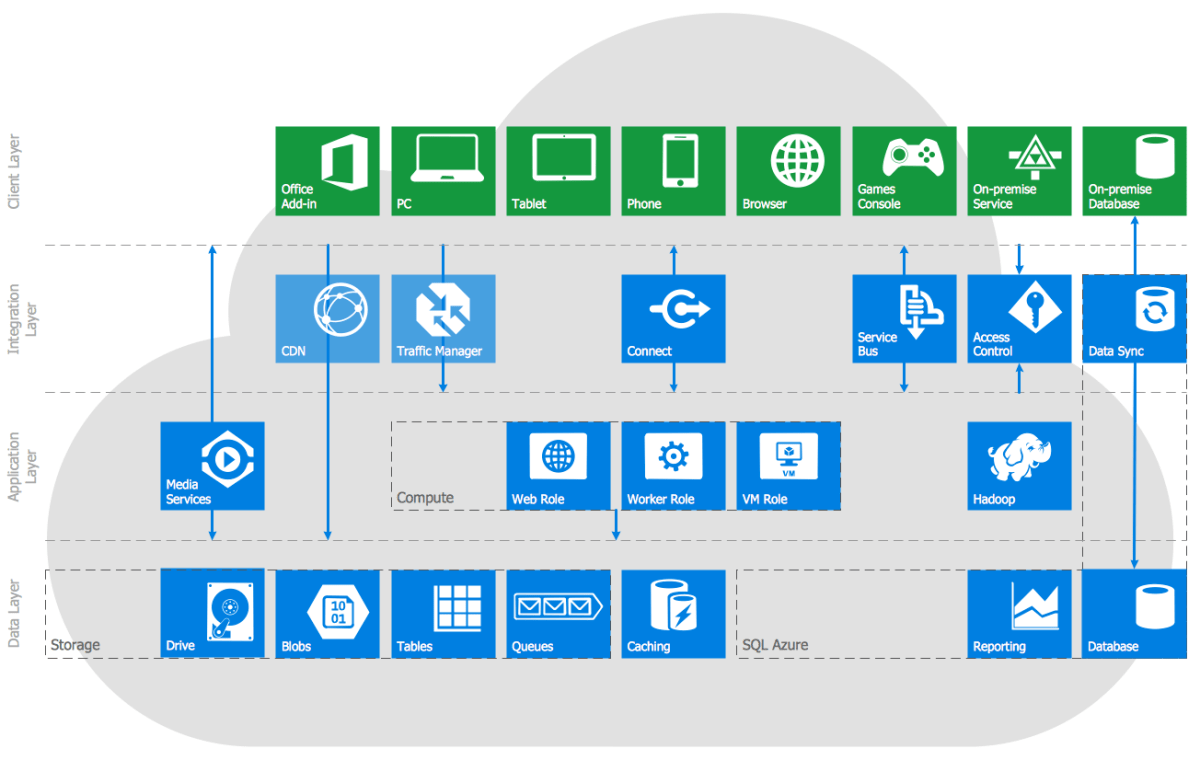
Serverless doesn’t mean there are no servers—it means you don’t manage them. Azure Functions abstracts away the infrastructure, allowing developers to focus solely on writing code. The platform automatically scales based on demand, spinning up instances when needed and shutting them down when idle.
- No need to configure VMs or containers
- Automatic scaling handles traffic spikes
- You only pay for the time your code runs
This model drastically reduces operational overhead and accelerates time-to-market for new features.
How Azure Functions Work
At its core, an Azure Function is a piece of code triggered by an event. When an event occurs—such as an HTTP request or a file upload to Blob Storage—the Azure Functions runtime executes the function. The process is fast, efficient, and highly scalable.
- Triggers initiate function execution
- Bindings allow easy integration with other services (e.g., Cosmos DB, Service Bus)
- Functions can be written in multiple languages including C#, JavaScript, Python, Java, and PowerShell
“Azure Functions allows developers to focus on what matters most: writing code that delivers value.” — Microsoft Azure Documentation
Learn more about the architecture at Microsoft’s official Azure Functions overview.
Azure Functions vs Traditional Hosting Models
Understanding the differences between Azure Functions and traditional hosting models like virtual machines (VMs) or web apps is crucial for making informed architectural decisions.
Cost Efficiency Comparison
With traditional VMs, you pay for uptime—even when the server is idle. Azure Functions operate on a consumption-based pricing model. You’re billed only for the number of executions, execution time, and memory used.
- VMs: Pay 24/7 for allocated resources
- App Services: Pay for reserved capacity
- Azure Functions: Pay per execution (as low as $0.20 per million executions)
This makes Azure Functions ideal for sporadic or unpredictable workloads.
Scalability and Performance
Traditional applications require manual or rule-based scaling. Azure Functions scale automatically. If 1000 requests hit your function simultaneously, Azure spins up multiple instances instantly.
- No need to configure auto-scaling rules
- Instant response to traffic surges
- Automatic load balancing across instances
However, cold starts—where a function takes longer to initialize after being idle—can impact latency-sensitive applications. Premium and Dedicated plans help mitigate this.
Key Features of Azure Functions
Azure Functions come packed with features designed to simplify development, improve performance, and integrate seamlessly with the broader Azure ecosystem.
Event-Driven Triggers
Functions can be triggered by a wide range of events, making them ideal for real-time processing and automation. Supported triggers include:
- HTTP/Webhook (perfect for APIs)
- Timer (for scheduled tasks)
- Azure Blob Storage (trigger on file upload)
- Azure Service Bus (message queue processing)
- Azure Event Hubs (high-throughput event streaming)
- Cosmos DB (trigger on document changes)
This flexibility allows developers to build reactive systems that respond instantly to changes in data or user behavior.
Language Support and Development Flexibility
One of Azure Functions’ biggest strengths is its support for multiple programming languages. Whether you’re a .NET developer or a Python enthusiast, you can use your preferred stack.
- C# (.NET 6, .NET 8 supported)
- JavaScript/Node.js
- Python (3.7–3.11)
- Java (11, 17)
- PowerShell
- TypeScript (via Node.js)
Additionally, Azure Functions supports both in-portal editing and local development using Visual Studio, VS Code, or the Azure Functions Core Tools. This enables a smooth developer experience from coding to deployment.
Integration with Azure Services
Azure Functions are deeply integrated with other Azure services, enabling powerful workflows with minimal code. For example:
- Read data from Azure Blob Storage and process it using Cognitive Services
- Trigger a function when a new row is added to Azure SQL Database via Change Feed
- Send notifications through Azure Notification Hubs
- Orchestrate complex workflows using Durable Functions
Bindings simplify these integrations by allowing declarative connections to services, reducing boilerplate code. Input and output bindings handle data retrieval and storage automatically.
Use Cases for Azure Functions
The versatility of Azure Functions makes them suitable for a wide array of real-world scenarios. From backend APIs to data processing pipelines, they offer a lightweight, scalable solution.
Building RESTful APIs
Azure Functions can serve as lightweight backends for web and mobile applications. Using HTTP triggers, you can create RESTful endpoints that respond to GET, POST, PUT, and DELETE requests.
- Fast deployment of microservices
- Low-latency response for API calls
- Easy integration with Azure API Management for security and throttling
For example, a mobile app might use an Azure Function to authenticate users, process orders, or fetch product data—all without managing a backend server.
Data Processing and ETL Pipelines
Functions are excellent for Extract, Transform, Load (ETL) operations. When a file is uploaded to Azure Blob Storage, a function can automatically process it—converting formats, validating data, or loading it into a database.
- Automated invoice processing from uploaded PDFs
- Real-time log analysis from application telemetry
- Image resizing or video transcoding on upload
By chaining multiple functions together, you can build robust data pipelines that scale with your data volume.
Automating DevOps and IT Tasks
IT teams use Azure Functions to automate routine tasks, reducing manual effort and human error. Examples include:
- Automated backups of databases on a schedule
- Monitoring resource health and sending alerts
- Auto-scaling based on custom metrics
- Cleaning up unused resources to reduce costs
A timer-triggered function can run nightly to check for unattached disks or idle VMs and shut them down—saving money without sacrificing availability.
Deployment and Management of Azure Functions
Deploying and managing Azure Functions is streamlined through various tools and platforms, ensuring a smooth developer experience from local development to production.
Development Tools and SDKs
Microsoft provides robust tooling for building Azure Functions:
- Visual Studio: Full IDE support for C# functions with debugging and publishing
- VS Code: Lightweight editor with Azure Functions extension for all supported languages
- Azure CLI: Command-line interface for scripting deployments
- GitHub Actions: CI/CD integration for automated testing and deployment
The Azure Functions Core Tools allow developers to run and test functions locally before deploying to the cloud, ensuring reliability and reducing deployment risks.
Deployment Options
Azure Functions support multiple deployment strategies:
- Zip Deploy: Upload code as a ZIP file
- Run from Package: Deploy as a read-only package for better performance
- Continuous Integration/Continuous Deployment (CI/CD) via Azure DevOps or GitHub
- Terraform or ARM templates for infrastructure-as-code
Each method offers trade-offs in speed, control, and automation. For teams practicing DevOps, CI/CD pipelines ensure consistent, repeatable deployments.
Monitoring and Diagnostics
Monitoring is critical for maintaining performance and reliability. Azure Functions integrate natively with Azure Monitor and Application Insights.
- Real-time logs and metrics
- Detailed execution traces
- Custom telemetry and exception tracking
- Alerts based on execution failures or latency
Application Insights provides deep visibility into function performance, helping identify bottlenecks and optimize cold start times. You can even set up dashboards to monitor key KPIs across multiple functions.
Security and Best Practices for Azure Functions
While Azure Functions simplify development, security must not be overlooked. Implementing best practices ensures your functions are resilient, secure, and maintainable.
Authentication and Authorization
Securing HTTP-triggered functions is essential. Azure provides several options:
- Function Keys: Simple API keys for basic access control
- Host Keys: Higher-level keys that grant access to all functions in an app
- Azure Active Directory (AAD): Enterprise-grade authentication
- API Management: Advanced security, rate limiting, and OAuth integration
For public APIs, avoid using function keys in client-side code. Instead, use API Management as a gateway to enforce policies and hide backend details.
Secure Coding Practices
Developers should follow secure coding guidelines when building functions:
- Validate all inputs to prevent injection attacks
- Avoid hardcoding secrets—use Azure Key Vault instead
- Limit function permissions using Managed Identities
- Keep functions small and focused (Single Responsibility Principle)
Using Managed Identities allows functions to securely access other Azure resources without storing credentials in code or configuration files.
Performance Optimization Tips
To get the most out of Azure Functions, consider these performance tips:
- Use the Premium or Elastic Premium plan to reduce cold starts
- Minimize package size to speed up deployment and startup
- Reuse connections (e.g., HTTP clients, database connections) across invocations
- Use Durable Functions for long-running or stateful workflows
Additionally, enabling Proxies can help route requests efficiently and reduce latency by caching responses or rewriting URLs.
Pricing and Cost Management for Azure Functions
Understanding the pricing model is essential for budgeting and optimizing costs in production environments.
Consumption Plan vs Premium Plan
Azure Functions offer several hosting plans, each suited to different workloads:
- Consumption Plan: Pay-per-execution, auto-scales, ideal for sporadic traffic
- Premium Plan: Always-on instances, reduced cold starts, better performance for steady workloads
- Dedicated (App Service) Plan: Run functions on dedicated VMs, full control over scaling
The Consumption Plan is the most cost-effective for unpredictable traffic, while the Premium Plan suits latency-sensitive applications like APIs.
Cost Estimation and Monitoring
Microsoft provides a pricing calculator to estimate costs based on expected executions, duration, and memory usage. Key cost factors include:
- Number of executions per month
- Average execution duration (in GB-seconds)
- Memory allocation per function
- Data transfer and storage costs
Using Azure Cost Management, teams can track spending, set budgets, and receive alerts when thresholds are exceeded.
Future Trends and Innovations in Azure Functions
Azure Functions continue to evolve, with Microsoft investing heavily in performance, developer experience, and ecosystem integration.
Serverless Beyond Compute
The serverless paradigm is expanding beyond compute. Services like Azure Logic Apps, Event Grid, and Static Web Apps complement Azure Functions to create fully serverless architectures.
- Event Grid enables event routing between services
- Logic Apps provides low-code workflow automation
- Static Web Apps host frontends with integrated API backends via Functions
Together, these services enable end-to-end serverless applications with minimal operational overhead.
AI and Machine Learning Integration
Microsoft is integrating AI capabilities directly into Azure Functions. Developers can now invoke Azure OpenAI models, Cognitive Services, or custom ML models from within a function.
- Real-time sentiment analysis on user feedback
- Image recognition in uploaded media
- Automated document summarization
This opens new possibilities for intelligent, event-driven applications that respond contextually to user input or environmental changes.
Edge and Hybrid Scenarios
With Azure Functions running on Azure Stack Edge and IoT Edge, serverless computing is moving closer to the data source. This enables real-time processing in low-latency or disconnected environments.
- Process sensor data on-premises before sending to the cloud
- Run anomaly detection at the edge
- Reduce bandwidth costs by filtering data locally
As edge computing grows, Azure Functions will play a key role in distributed, intelligent systems.
What are Azure Functions used for?
Azure Functions are used for building event-driven, scalable applications without managing infrastructure. Common uses include APIs, data processing, automation, and integrating with other cloud services.
How much do Azure Functions cost?
Pricing depends on the plan. The Consumption Plan charges per execution (free tier includes 1 million requests/month). The Premium Plan has a fixed hourly rate plus execution costs, offering better performance and reduced cold starts.
Can Azure Functions call other Azure services?
Yes, Azure Functions can seamlessly integrate with services like Blob Storage, Cosmos DB, Service Bus, and Cognitive Services using input/output bindings or SDKs.
How do I secure an Azure Function?
Use function keys, Azure AD authentication, API Management, and Managed Identities. Avoid hardcoding secrets and always validate inputs to prevent security vulnerabilities.
What is a cold start in Azure Functions?
A cold start occurs when a function is invoked after being idle, causing a delay as the runtime initializes. This can be mitigated by using the Premium Plan or keeping functions warm with periodic pings.
Azure Functions represent a paradigm shift in cloud computing—offering agility, scalability, and cost-efficiency. Whether you’re building a simple webhook or a complex data pipeline, Azure Functions provide the tools to deliver value faster. By leveraging triggers, bindings, and seamless Azure integration, developers can focus on innovation rather than infrastructure. As serverless continues to evolve, Azure Functions will remain at the forefront, empowering teams to build smarter, faster, and more resilient applications.
Further Reading: